Photoshop tutorial
|
Members
|
It's not that hard to make!
1. Create a new transparent image, approximately 400x400 2. Fill it with a black color 3. Draw lines with a soft brush(20 pixels) as shown in the picture. I chose blue as the main color.  4. Motion blur the layer with 999 pixels (filter --> blur --> motion blur) 5. Go to filter --> stylize --> find edges 6. Now inverse the layer by pressing ctrl-i . (IMG:http://home.hetnet.nl/~whiteeagleonline/Tutorials/EW2.jpg) 7. Duplicate the layer (layer1). 8. Go to filter --> distort --> wave Use something like these settings: number of generators : 1 Wavelenght and amplitude minimum : 1 Wavelenght and amplitude maximum : 230 , 169 Repeat edges Pixels (IMG:http://home.hetnet.nl/~whiteeagleonline/Tutorials/EW3.jpg) 9. Use the wave filter again by pressing ctrl-f. 10. Set the layer blending mode to Linear Dodge. 11. Duplicate the layer(layer1 copy) 12. Mirror the layer by pressing ctrl-t and then right-mouse-click and then choose flip horizontal. 13. Use the wave filter again by pressing ctrl-f 1 or 2 times. 14. You're akmost done. Repeat step 12, 13 and 14 on the new layer and you're done. 15. If everything went okay your picture should look like this picture. (IMG:http://home.hetnet.nl/~whiteeagleonline/Tutorials/EW4.jpg) Have fun designing |
|
Super Moderators
|
Oh how cool, I never knew it was that simple. I'll have to try something like that soon. ^_^v
|
|
GM Support Team
|
*doesn't see any pictures for some odd reason.* o.O
|
|
Super Moderators
|
Yea weird...I can see them all. :/
|
|
Members
|
ill post up some more tutorials soon..
PM me if u want to know a tutorial about a specific (dunno if i wrote it right) thing and i'll try to help u out  |
|
GM Support Team
|
I wanna see some flames, yo.
|
|
Members
|
I'll post up a fire tutorial..
Lemme put some things together for u guys |
|
Members
|
This 1 is for you kawaiimaruchan, I hope u mean something like this.. it's also an easy tutorial for fire effects..!
1)Open a new file, around 400 x 300 pixels. with a white background. 2) Now set your forground color to white and background color to black. (IMG:http://www.bluesfear.com/images/tutorials/lightning_1.gif) 3) Go to FILTER > RENDER > CLOUDS. 4) Go to FILTER > RENDER > LIGHTING EFFECTS and use these settings (IMG:http://www.bluesfear.com/images/tutorials/fire_1.jpg) 5) Make a Copy of this layer. 6) With the copy go to FILTER > BRUSH STROKES > ACCENTED EDGES. Use these settings 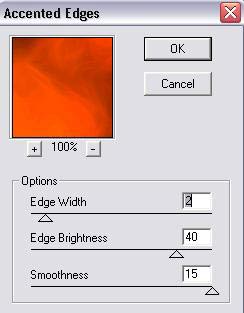 6) Now on the copy layer. Select the ERASE TOOL and brush size 200. Then delete the brightest spot of the fire. 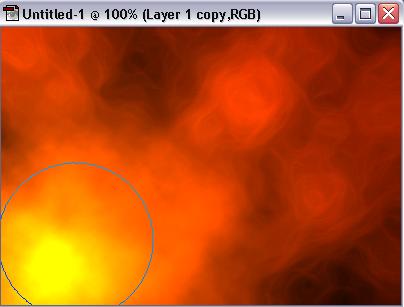 And this is how u get a fire effect.. i'll post some more of lighting and such later..! |
|
Members
|
hizlle that avatar is soo funny ive seen it before though and it came with a song. :ph34r:
|
|
Members
|
lol I know
 |
|
Members
|
There a site where i can dl photoshop??
|
|
Members
|
yes
|
|
Members
|
can i know where?
|
|
Members
|
nope
|
See the originals, frozen in time: devilish-ro.org · hax-studios.net/devilish (2004)
Archive of the Devilish RO forums · preserved thanks to the Internet Archive.
These posts are archived from a community that was active more than 20 years ago (2004–2009). Views expressed are those of the original authors at the time of posting and may no longer reflect their present views. This archive is preserved for historical and reference purposes only.