
Layered Ice Effect For Photoshop
|
Members
|
1. Create a new image that's about 250x250 with a black background
2. Then go to filter > render > lens flare. Keep rendering lens flare's so your image looks similar this: (IMG:http://zoicsol.fu8.com/images/tutorials/1/image1.gif) 3. Go to filter > distort > wave and use the following settings: (IMG:http://zoicsol.fu8.com/images/tutorials/1/image2.gif) 4. Should look like: (IMG:http://zoicsol.fu8.com/images/tutorials/1/image3.gif) 5. Now we need to use polar cordinates (filter > distort > polar cordinates) and select "polar to rectangular." (IMG:http://zoicsol.fu8.com/images/tutorials/1/image4.gif) 6. Adjust the color of your image by going to image > adjustments > hue/saturation or clicking ctrl+U. I used the following settings: 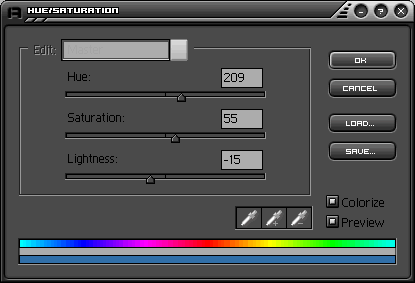 7. You should end up with something like this: 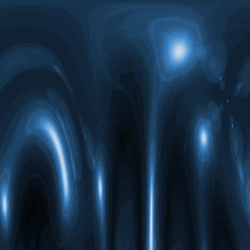 8. Now lets add the effect of icicles, go to filter > stylize > wind and have the wind come from the right. (IMG:http://zoicsol.fu8.com/images/tutorials/1/image7.gif) 9. Last thing we need to do is rotate the canvas (image > rotate canvas > 90 CCW). This is what I came up with: (IMG:http://zoicsol.fu8.com/images/tutorials/1/image8.gif) |
|
Members
|
Oh dude. This one's cool, too. xD
|
See the originals, frozen in time: devilish-ro.org · hax-studios.net/devilish (2004)
Archive of the Devilish RO forums · preserved thanks to the Internet Archive.
These posts are archived from a community that was active more than 20 years ago (2004–2009). Views expressed are those of the original authors at the time of posting and may no longer reflect their present views. This archive is preserved for historical and reference purposes only.